Alipay Cross Border Online Payment Documentation v1.7.0
Alipay Cross Border Online Payment
Created: 01/07/2017
Updated: 26/05/2020
By: Centil.co
Email: info@centil.co
Thank you for purchasing my plugin. If you have any questions that are beyond the scope of this help file, please feel free to email me. Thanks so much!
Table of Contents
- Overview
- Installation
- Quick Start Guide
- Supported Currency List
- Configuration
- Test Your Alipay Setup
- Alipay Payment Page Translation
- File Structure
Overview - top
The Alipay Cross-Border Online Payment plugin for WooCommerce allows your business which is not in China to accept payment from the 1.3 billion-person China market.
With 700 million users, Alipay is the most-used payment gateway in China. Although your business is not in China, with the Alipay Cross-Border Online Payment plugin, your website will be able to accept payments from residents and businesses inside Mainland China using a payment method they are familiar and comfortable with. This will give you access to a massive potential customer base.
Installation - top
Prior installation, you'll need to have WooCommerce plugin installed. Then you may refer the official WordPress Plugin Installation Guide to proceed our plugin installation. After you've installed and enabled Alipay Cross Border Online Payment, you shall goto WooCommerce -> Settings -> Checkout -> Alipay Cross Border to customize and setup Alipay Cross Border Online Payment gateway.
Quick Start Guide - top
- After plugin installation and activation, goto WooCommerce -> Settings -> Checkout -> Alipay Cross Border
- Check the Enable checkbox
- Fill-in Alipay Partner ID (PID) and Alipay Security Code/Key that you received from Alipay account registration
- Click Save changes. Your Alipay Cross Border Online Payment gateway is now ready to use
- You can test paying with Alipay Sandbox account (PID:2088101122136241, Security Code:760bdzec6y9goq7ctyx96ezkz78287de)
Supported Currency List - top
Alipay user from China will be able to make payment on your website using either of below currencies:
- U.S. Dollar
- Australian Dollar
- Canadian Dollar
- Confederation Helvetica Franc
- Danish Krone
- Euro
- British Sterling
- Hong Kong Dollar
- Japanese Yen
- Korean Won
- Norwegian Krone
- New Zealand Dollar
- Swedish Krona
- Singapore Dollar
- Thai Baht, U.S. Dollar
Configuration - top
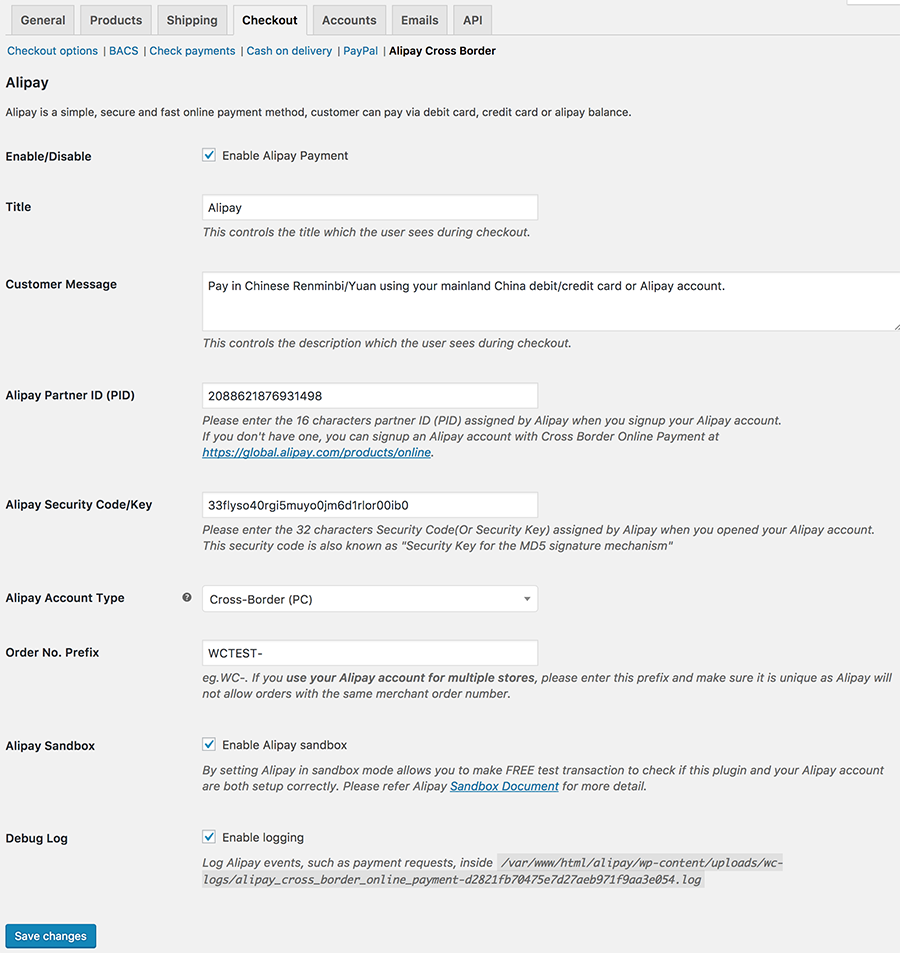
After enabling Alipay Cross Border Online Payment, you can access it at WooCommerce -> Settings -> Checkout -> Alipay Cross Border. Below is description of each feature:
| Feature | Description |
|---|---|
| Enable/Disable | To enable or disable this plugin. When Disable is checked, your customer will not be able to pay using Alipay. |
| Title | This controls the title which the user sees during checkout. Default to Alipay. |
| Customer Message | This controls the description which the user sees during checkout. |
| Alipay Partner ID (PID) | Please enter the 16 characters partner ID (PID) assigned by Alipay when you signup your Alipay account. If you don't have one, you can signup an Alipay account with Cross Border Online Payment at https://global.alipay.com/products/online. |
| Alipay Security Code/Key | Please enter the 32 characters Security Code(Or Security Key) assigned by Alipay when you signup your Alipay account. This security code is also known as "Security Key for the MD5 signature mechanism". |
| Alipay Account Type | Please enter the account type that you've applied from Alipay. It should be either HK Wallet (PC2Mobile), Cross Border, New Cross Border (PC), New Cross Border (WAP)(For mobile web. Plugin will auto disable for user from PC) or New Cross Border (Auto) (Plugin will auto detect if your visitor is using mobile device or PC and redirect them to a device compatible Alipay payment site). |
| Order No. Prefix | eg.WC-. If you use your Alipay account for multiple stores, please enter this prefix and make sure it is unique as Alipay will not allow orders with the same merchant order number. | Alipay Sandbox | By setting Alipay in sandbox mode allows you to make FREE test transaction to check if this plugin and your Alipay account are both setup correctly. Please refer official Alipay Sandbox Document or Test Your Alipay Setup for more detail. |
| Debug Log | Log Alipay events, such as payment requests for debugging purpose. |
Test Your Alipay Setup - top
When you enabled Alipay Sandbox under WooCommerce -> Settings -> Checkout -> Alipay Cross Border, Alipay Cross Border Online Payment will redirect all new purchase transaction to Alipay test purchase website at https://openapi.alipaydev.com. This allows you to test your Alipay account integration with the website and proceed purchase transaction without paying any actual money.
In case you do not have Alipay user/buyer account to test purchase, you can utilise Alipay user test account below to proceed with test payment:
- Download Alipay Sandbox app from Alipay (Android only)
- Login the app with:
- Buyer Account: forex_1482393408315@alitest.com
- Buyer UID: 2088102181783812
- Login password: a111111
- Payment password: b111111
You can make unlimited test transaction to test your website integration with Alipay and there is no actual charges apply.
Alipay Payment Page Translation - top
Since the Alipay payment screens are in Chinese only (with NO translations available) and the screens are also quite complicated, it might be a problem for those who don't know Chinese. If you are using Google Chrome or Firefox to perform testing, you may use Google Translate plugin for browser below to instant translate the page in Chinese to your preferred language.
File Structure - top
- wc-acbop.php: Main plugin file
- images
- alipay-icon-01.png: Alipay icon that shows on checkout page
- includes
- class-wc-acbop.php: Main payment gateway class
- form-settings-alipay.php: Setting page codes
- function-common.php: Common function codes
- lib: Folder to store all Alipay library core files
Once again, thank you so much for purchasing this theme. We are glad to help you if you have any questions related to this plugin. If you have critical issue to resolve, you may directly email us since we check email more often. If you have more general question related to the plugin, you might consider visiting the Themeforest/Codecanyon product page and ask your question in the "Item Discussion" section.
Centil Technology